Custom Electronics Packaging Boxes: How to Organize Devices, Chargers, Cables and Accessories
Electronics packaging often needs to hold much more than the main device. Learn how to organize chargers, cables, adapters, manuals and accessories inside one custom packaging system without adding unnecessary size or complexity.
 Published May 01, 2026
Updated September 04, 2026
15 min read
Published May 01, 2026
Updated September 04, 2026
15 min read
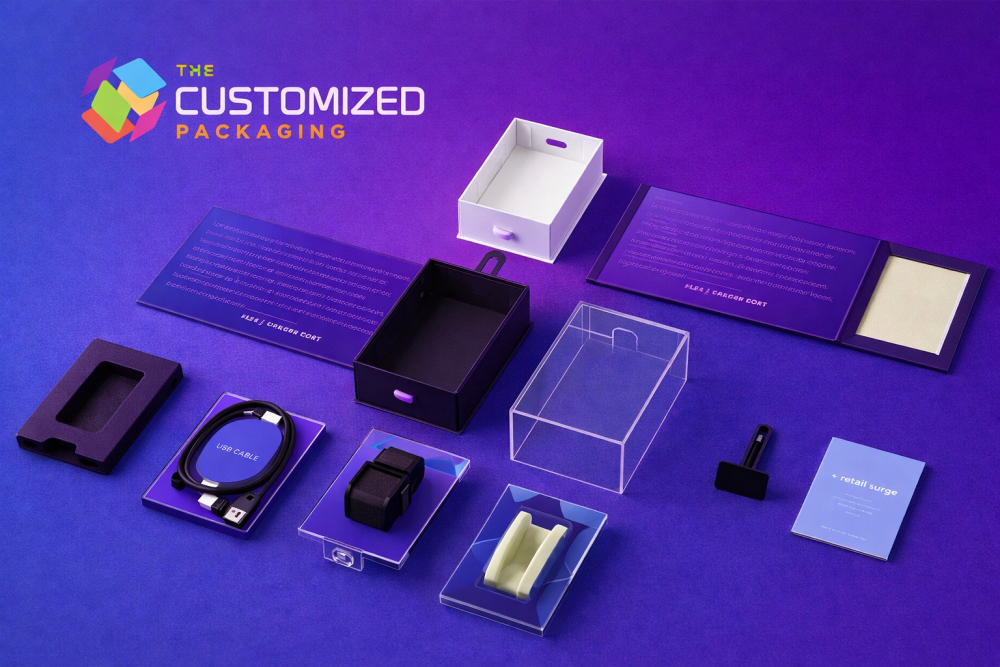
Custom electronics packaging boxes often need to hold much more than one device.
A technology product may arrive with a charger, power cable, USB cable, adapter, detachable component, manual, warranty card or other accessory. If these pieces are added after the main box has already been designed, the package can become oversized, disorganized or difficult to pack.
A better approach is to plan the entire product set before deciding the final box dimensions.
Lay out the device and every included component, decide which items need separation, determine how customers should remove them, and then develop the outer packaging and internal structure around that arrangement.
This creates a clearer starting point for electronics brands requesting custom packaging and gives the packaging team more useful information for developing the box, insert and quote.
Start With Everything That Goes Inside the Box
Do not begin with the device alone.
Create a complete list of everything the customer will receive.
Depending on the product, that may include:
-
Main electronic device
-
Charger
-
Power cord
-
USB cable
-
Adapter
-
Detachable microphone
-
Remote control
-
Replacement component
-
Mounting hardware
-
Carrying case
-
User guide
-
Warranty card
-
Setup card
Then decide whether every item will be included in every SKU.
This matters because a package designed for a device with one cable may not work when another version includes a charger, adapter and additional accessories.
The final package should reflect the real sellable configuration.
Build the Layout Before Choosing the Box Size
Once the complete product set is known, arrange the components physically.
The goal is not simply to make everything fit.
The layout should keep heavy and hard components from contacting surfaces that may be damaged while also making the package straightforward to pack and open.
A charger placed loose beside a glossy device may shift during handling. A cable sitting directly over controls or a screen may create pressure in the wrong area. A manual placed beneath an insert may become difficult for customers to find.
Decide where every component belongs before measuring the final package.
Match Each Component With a Packaging Job
Different electronics components create different packaging requirements.
| Component | Main Packaging Concern | Possible Arrangement |
|---|---|---|
| Main device | Movement, surface contact and removal | Fitted cavity, platform or supported compartment |
| Charger | Weight and contact with device | Separate side compartment or accessory box |
| Cable | Coil control and connector positioning | Channel, paper band, sleeve or divided section |
| Adapter | Small size and movement | Dedicated pocket or fitted compartment |
| Manual | Visibility and easy access | Paper pocket, folder or lid compartment |
| Small parts | Loss and uncontrolled movement | Small accessory carton or divided section |
The final structure depends on the size, weight and sensitivity of the actual components.
The table is a planning guide rather than a universal specification.
Give the Main Device a Defined Position
The main device should not rely on the charger, cable or paperwork to keep it in place.
Its position should be determined by the product dimensions and the type of support required.
A fitted platform or compartment can help control movement and keep the product oriented correctly when the box opens.
The supporting structure should also allow the customer to remove the device without excessive force.
Finger notches, open edges, lift tabs or other access features may be appropriate depending on the product and insert.
Products such as laptops, headphones, smart devices and gaming electronics can have very different shapes, so their support should be developed around the actual item rather than a generic electronics cavity.
Separate Heavy Chargers From Delicate Devices
Power adapters can be considerably heavier than cables or documentation.
Allowing a charger to move freely beside a device can create unwanted contact during handling and delivery.
A dedicated compartment can keep the adapter separated from displays, controls, connectors and decorative surfaces.
The compartment may sit:
-
Beside the device
-
Beneath a separate platform
-
Inside an accessory box
-
At one end of the package
-
Inside another protected section
For computer products where the charger and device require more detailed engineering, custom laptop boxes provide a more product-specific packaging approach.
Keep Cables Organized Without Creating Sharp Bends
A cable should fit naturally within its intended arrangement.
Do not force a long cable into an unnecessarily small cavity if doing so creates tight bends near connectors or strain-relief areas.
Decide how the cable will be prepared before measuring the compartment.
It may be:
-
Coiled
-
Folded
-
Held with a paper band
-
Placed inside a paper sleeve
-
Positioned in a molded or folded channel
The selected arrangement should be repeatable at the packing station.
If every worker coils the cable differently, a tightly designed compartment may no longer function consistently.
For cable-specific retail requirements such as connector protection, hang tabs and compatibility information, custom HDMI cable boxes are a more focused reference.
Give Adapters and Small Accessories Their Own Place
Small components are easy to overlook during box development.
USB adapters, replacement tips, mounting parts and other accessories can move underneath larger products or become difficult to find.
A small compartment, pocket or accessory carton can provide a defined position.
This also helps the customer understand what is included.
When several small pieces look similar, consider whether the insert or printed packaging should help identify them.
The packaging should make the complete kit easier to understand rather than simply hiding accessories below the main product.
Decide Where Documentation Belongs
User manuals, warranty information, setup instructions and promotional cards also take up space.
Even thin paperwork can affect the internal dimensions when it is folded, stacked or placed beneath a fitted tray.
Choose a consistent location.
Options can include:
-
Under the lid
-
Beside the device
-
Beneath a removable tray
-
Inside a paper pocket
-
Inside a small folder
Do not place thick documentation where it creates pressure against a screen or prevents the box from closing correctly.
Use Inserts to Control the Layout
Custom packaging inserts can provide a specific position for the device and its accessories.
Possible insert materials and structures include paperboard, corrugated supports, molded pulp and selected foam systems.
The best option depends on the packed weight, desired presentation, product sensitivity, required support and distribution method.
An insert should solve a defined problem.
It may need to:
-
Limit movement
-
Separate hard components
-
Hold a device at a particular height
-
Organize accessories
-
Protect finished surfaces from direct contact
-
Make components easier to identify
-
Improve product removal
Adding a complicated insert purely for appearance can increase size, tooling and assembly without necessarily improving the package.
Compare Common Internal Layouts
A buyer does not always need the most complex structure.
| Packaging Layout | Best Suited For | Main Advantage |
|---|---|---|
| Device with side compartment | Device plus charger or cable | Simple separation |
| Device above accessory section | Compact kits with several components | Uses vertical space |
| Divided tray | Several similarly sized accessories | Clear organization |
| Device platform with document pocket | Product plus manuals and cards | Keeps paperwork separate |
| Multi-level insert | Premium technology kits | Controlled reveal and organization |
| Simple fitted carton | One lightweight product | Lower complexity |
Choose the layout according to the real product configuration rather than the appearance of a mockup.
Keep Hard Components Away From Screens and Finished Surfaces
A polished plastic shell, display, control surface or coated component can be affected by repeated contact with another hard object.
Organize the package so chargers, plugs, adapters and metal accessories do not rest directly against sensitive areas.
This may require a divider, sleeve, compartment or another form of separation.
For over-ear or gaming audio products, custom headphone boxes can be developed around ear cups, headbands, microphones, controls and charging accessories rather than using a generic electronics layout.
Do Not Make the Outer Box Larger Than the Internal System Requires
It is easy to create excessive empty space when accessories are added without a defined layout.
Instead, establish the product arrangement first.
Then determine the usable internal dimensions required for:
-
Main device
-
Accessory compartments
-
Insert walls
-
Removal clearance
-
Documentation
-
Any required protective layers
After that, develop the external box dimensions from the completed internal system.
This approach helps avoid unnecessarily large packages while still providing enough room for the actual components.
Choose the Box Structure After the Product Layout
Different electronics products can require very different outer structures.
A lightweight accessory may work in a folding carton.
A compact ecommerce product may use a corrugated mailer.
A higher-value technology kit may use a rigid presentation structure.
A heavier device may require stronger corrugated packaging.
The product layout should therefore come before the decorative box style.
If the main requirement is store presentation, hanging features, windows or counter displays, the dedicated electronics display packaging guide covers those retail-specific decisions in greater detail.
Separate Retail Packaging From Shipping Protection
An attractive electronics carton is not automatically a complete parcel-delivery solution.
The retail package may need an additional shipping carton or mailer when sold online.
This is particularly relevant when the retail package uses:
-
Lightweight folding paperboard
-
A decorative rigid box
-
A large window
-
Premium surface finishes
-
A hanging tab
The outer shipping package and inner retail carton should be evaluated together when the product will move through ecommerce fulfillment.
For heavier or distribution-focused applications, custom corrugated shipping boxes can provide the outer transport layer around the completed electronics package.
Plan Printed Information Around the Actual Product
Custom electronics packaging boxes often need more functional information than many other retail packages.
Depending on the product, useful printed information may include:
-
Model name
-
Product type
-
Compatibility
-
Connector type
-
Voltage or electrical information supplied by the manufacturer
-
Included accessories
-
Barcode
-
SKU
-
Serial-number area
-
QR code
-
Setup information
-
Warranty information
-
Customer-support details
Organize this information before artwork is finalized.
The logo should not force technical information into tiny, difficult-to-read areas.
Use Packaging to Show What Is Included
When customers buy technology products, included accessories can influence the purchase decision.
If the package contains a charger, cable, adapter or other component, make the contents clear where appropriate.
A simple “What's Included” panel can help customers understand the kit.
For example:
Inside the Box
-
Main device
-
USB-C cable
Power adapter
Quick-start guide
The exact wording should match the real product configuration.
Do not show or print an accessory that is not included.
Keep Different Models Easy to Identify
Technology brands often use similar packaging across several models.
A controlled visual system can keep the range consistent while reducing confusion.
Different models may use:
-
Model names
-
Product images
-
Color bands
-
Device sizes
-
Compatibility labels
-
Storage capacity
-
Connector type
-
SKU codes
Do not rely on color alone when the difference between products is technically important.
Printed wording should make the model or configuration clear.
Reserve Space for Barcodes, QR Codes and Labels
Functional areas should be planned before decorative artwork fills every panel.
Barcodes need suitable contrast and clear space.
QR codes should be tested after printing.
Serial-number labels or retailer-applied stickers may also need dedicated areas.
If a shipping label will be applied directly to the package, reserve enough exterior space for it.
A beautiful design loses practical value if operational labels cover the main product name or important instructions.
Treat ESD Requirements Separately From Ordinary Packaging
Not every electronics product requires specialized electrostatic-discharge protection.
If your device or component does require ESD control, state that requirement during packaging development.
Do not assume that standard paperboard, corrugated board or ordinary decorative foam automatically provides the required ESD protection.
The specialized protective layer or material should be selected according to the actual electronic product and its technical requirements.
The decorative retail box can then be designed around that protection where necessary.
Consider Moisture and Other Environmental Exposure Separately
An ordinary paper-based electronics box should not be treated as waterproof.
If the product requires a moisture barrier, protective bag, desiccant or another controlled protective layer, identify that requirement separately.
The outer printed carton may still provide branding, organization and physical structure, but it should not be expected to perform functions it was not designed or verified to provide.
Clear packaging specifications are more useful than broad protection claims.
Make Product Removal Part of the Design
A product can fit securely and still create a poor experience if customers cannot remove it easily.
Check whether fingers can reach the device.
For recessed products, consider access features such as:
-
Finger notches
-
Open sides
-
Pull tabs
-
Ribbon lifts
-
Removable trays
The right method depends on the product and insert.
Do not add a ribbon or pull mechanism automatically. Use it where the product position actually requires assistance.
Think About the Packing Sequence
Electronics packaging must also work for the people assembling it.
Document the order in which components should be packed.
For example:
-
Form the box
-
Install the insert
-
Position the main device
-
Add the charger
-
Place the cable
Add adapters or accessories
Insert documentation
Check the correct SKU
Close the package
Apply required labels
A logical sequence reduces the chance of accessories being forgotten or placed in the wrong compartment.
Standardize the Layout Across Related Products Where Practical
Brands with several electronics SKUs may be able to share parts of a packaging system.
For example, two models with similar dimensions might use the same outer structure while changing the insert or printed artwork.
Another product family may use a consistent visual layout but require different dimensions.
Standardization can simplify packaging management, but it should not force a large product cavity onto a smaller device.
The actual product fit remains the priority.
Test With the Complete Product Set
Never approve electronics packaging using only an empty box or the main device.
Pack everything that will be sold to the customer.
Check:
-
Device position
-
Charger fit
-
Cable arrangement
-
Adapter compartments
-
Manual placement
-
Insert retention
-
Box closure
-
Product removal
-
Label areas
-
QR-code scanning
-
Overall packed weight
If the package will be used for ecommerce, evaluate the completed product package together with its shipping layer.
What to Provide When Requesting an Electronics Packaging Quote
A complete brief helps the packaging team recommend a more appropriate structure and provide more useful pricing.
Include:
-
Main device dimensions
-
Product weight
-
Photos or drawings
-
Charger dimensions and weight
-
Cable dimensions and packed arrangement
-
Adapter dimensions
-
Other included accessories
-
Manual or card dimensions
-
Preferred product orientation
-
Insert requirements
-
Box style if already selected
-
Printing requirements
-
Quantity
-
Delivery destination
If you are unsure about the insert or internal layout, provide the product information first rather than guessing a cavity size.
Electronics Packaging Quote Checklist
| Information | What to Provide |
|---|---|
| Main product | Length, width, height and weight |
| Charger | Dimensions, weight and plug configuration |
| Cables | Type, length and intended packed arrangement |
| Accessories | Dimensions and quantity of each component |
| Documentation | Finished folded size and number of pieces |
| Internal layout | Preferred orientation or reference image |
| Protection | Insert, cushioning or specialized requirements |
| Printing | Logo, colors and technical information |
| Quantity | Required production quantity |
| Delivery | Destination and project deadline |
The more complete the product configuration, the easier it is to evaluate the packaging as one system.
Frequently Asked Questions
What are custom electronics packaging boxes?
Custom electronics packaging boxes are cartons developed around the dimensions, weight, components, presentation and distribution requirements of a specific electronic product or technology kit.
Should chargers and cables have separate compartments?
They often benefit from defined positions when loose movement could cause contact, tangling or a disorganized presentation. The exact structure depends on the product and package.
Do all electronics boxes need inserts?
No. Some lightweight accessories can use properly sized folding cartons or simple internal supports. Inserts are more useful when the product or accessories require positioning, separation or added organization.
What insert materials can be used for electronics packaging?
Options may include folded paperboard, corrugated supports, molded pulp and selected foam systems. The right material depends on product weight, protection requirements, presentation and any specialized technical needs.
Are ordinary cardboard electronics boxes anti-static?
Do not assume they are. Electronics requiring electrostatic-discharge control may need specialized packaging materials selected and verified for that purpose.
Can one box hold a device, charger, cables and manuals?
Yes. The package can be developed with separate compartments, trays, pockets or accessory sections around the complete product set.
What dimensions should I provide for a quote?
Provide the dimensions and weight of the main product plus every included charger, cable, adapter and accessory. Also provide the intended packed configuration if one has already been established.
Build Electronics Packaging Around the Complete Product
The most effective custom electronics packaging boxes start with everything the customer receives, not just the main device.
Arrange the device, charger, cables, adapters, manuals and accessories first. Decide which components need separation, which need controlled positioning and how the customer should remove them.
Then develop the insert and outer box around that complete configuration.
The Customized Packaging can develop custom printed electronics boxes for devices, accessories and complete technology kits using custom dimensions, internal compartments, inserts and branded printing.
Share your device measurements, accessory list, preferred packaging style, quantity and artwork to request a custom quote built around the complete product set.